Vehicle Pollution Certificate
The Vehicle Pollution Certificate document is used to track and manage the Pollution Under Control Certificates (PUCC) for every vehicle in your fleet. This ensures that all vehicles comply with mandatory environmental regulations. The system includes a feature to verify the certificate's validity against the official Vahan database.
How to Create a Vehicle Pollution Certificate
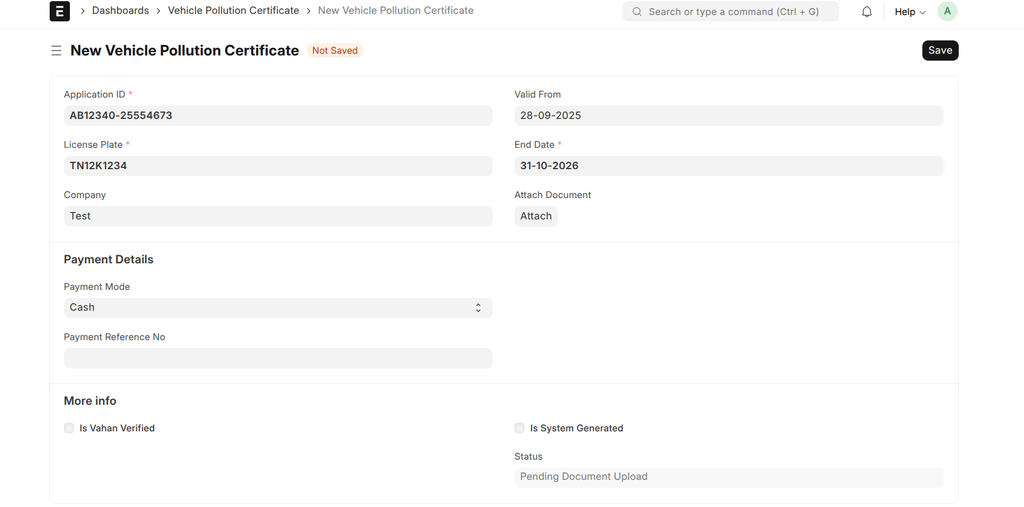
- Navigate to: Dashboards > Vehicle Pollution Certificate.
- Click + Add Vehicle Pollution Certificate.
- Fill in the certificate details as described in the table below. The Application ID and License Plate are mandatory.
- Upload a scanned copy of the PUCC using the Attach Document field. This is required for verification.
- Click Save.
- After saving, a Verify With Vahan button will appear. Click this button to automatically cross-check the certificate's expiry date with the Vahan service.
Fields Description
| Field | Description | Required |
|---|---|---|
| Application ID | The unique application or certificate number printed on the PUCC document. | Yes |
| License Plate | Link to the Vehicle this certificate belongs to. | Yes |
| Valid From | The start date of the PUCC's validity period. | No |
| End Date | The expiry date of the PUCC. This date must be after the "Valid From" date. | Yes |
| Attach Document | Field to upload a scanned PDF or image of the PUCC document. Verification is not possible without an attachment. | No |
| Payment Details | A section to record payment information for the certificate, including mode, reference number, and bank account if applicable. | No |
| Status | A read-only status that shows the current state of the certificate. It is updated automatically based on the workflow below. | No |
| Is Vahan Verified | A read-only checkbox that is automatically ticked if the certificate details match the data on the Vahan portal. | No |
| Verified Datetime | A read-only timestamp indicating when the last successful Vahan verification was completed. | No |
Verification and Status Workflow
The system provides a clear, color-coded status for each certificate to help you quickly identify compliance issues. The status is updated automatically based on document attachment and Vahan verification.
- Pending Document Upload: The record is created, but the PUCC document has not been uploaded. The "Verify With Vahan" button will not be visible.
- Not Verified: A document has been uploaded, but either the verification has failed (details don't match Vahan) or it has not been attempted yet.
- Verified: The document has been uploaded and its expiry date has been successfully validated against the official Vahan database.
- Expired: The certificate's "End Date" is in the past.
- Disabled: The certificate has been superseded by a newer one for the same vehicle. The system automatically disables older records.