Bus Trip Assignment
Introduction
The Bus Trip Assignment module in the ERPNext Vehicle Trip Tracking system lets fleet managers view and manage daily bus trip schedules and their vehicle mappings. This singleton document provides a snapshot of the trips scheduled for a specific date, the assigned vehicles, drivers, attendants, hosts, and operational incharges.
Purpose
It helps in organizing daily bus operations by displaying which vehicles are mapped to which schedules, showing trip and crew details at a glance, and allowing the assignment of trip rosters with a single click.
Key Features
- View daily bus schedules for selected date with vehicle, crew, and operational assignments.
- View and update vehicle to schedule mappings in a table.
- "Get Schedule" button loads active trip schedules and their current assignments for the date.
- "Set Current Location" button updates latest GPS location data of vehicles in the mapping.
- "Assign Trip Rosters" button creates or updates Trip Roster Assignments for each mapped bus schedule.
- Smart filtering for driver, attendant, host, and operational incharge fields to ensure relevant users are selectable.
How to Use Bus Trip Assignment
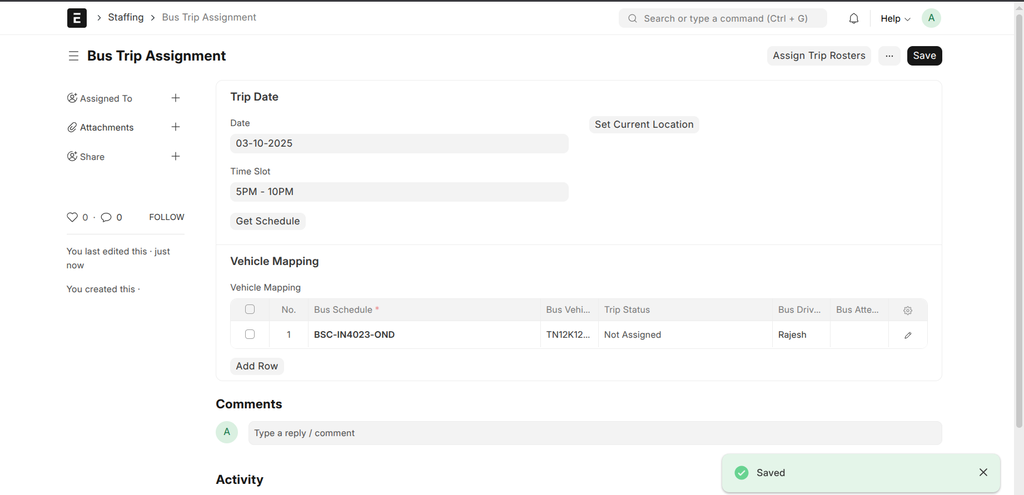
1. Select Date
Choose the date for which you want to view or manage bus trip assignments. Defaults to today's date.
2. Get Schedule
Click the "Get Schedule" button to load active schedules and their assignments for the selected date. This populates the Vehicle Mapping table showing bus schedules, assigned vehicles, drivers, attendants, hosts, and operational incharges.
3. Modify or Verify Mappings
Check or update vehicle assignments and crew members as needed within the Vehicle Mapping table. The fields have filters to show only the appropriate users or vehicles.
4. Set Current Location
Use the "Set Current Location" button to update GPS locations for the vehicles in the mapping. This keeps vehicle tracking data fresh.
5. Assign Trip Rosters
Click the "Assign Trip Rosters" button to create or update the Trip Roster Assignment documents based on the current vehicle mappings. This assigns trips and crews officially in the system.
Important Fields
| Field | Description | Required |
|---|---|---|
| Date | The date for which bus trip assignments are managed. | Yes |
| Time Slot | The time slot related to the trips, optional. | No |
| Vehicle Mapping | Table listing bus schedules, assigned vehicles, drivers, attendants, hosts, and operational incharges. | Yes |
Button Functions
- Get Schedule: Loads current active schedules and assignments for the selected date.
- Set Current Location: Updates the latest GPS location data for mapped vehicles.
- Assign Trip Rosters: Automatically creates or updates trip roster assignment documents for each mapping entry.
Tips and Best Practices
- Ensure vehicle, driver, and crew records are up to date for accurate assignment display and selection.
- Use the "Get Schedule" button regularly to refresh mapping data for the selected date.
- Use "Assign Trip Rosters" once the mappings are verified to push official trip assignments into the system.